

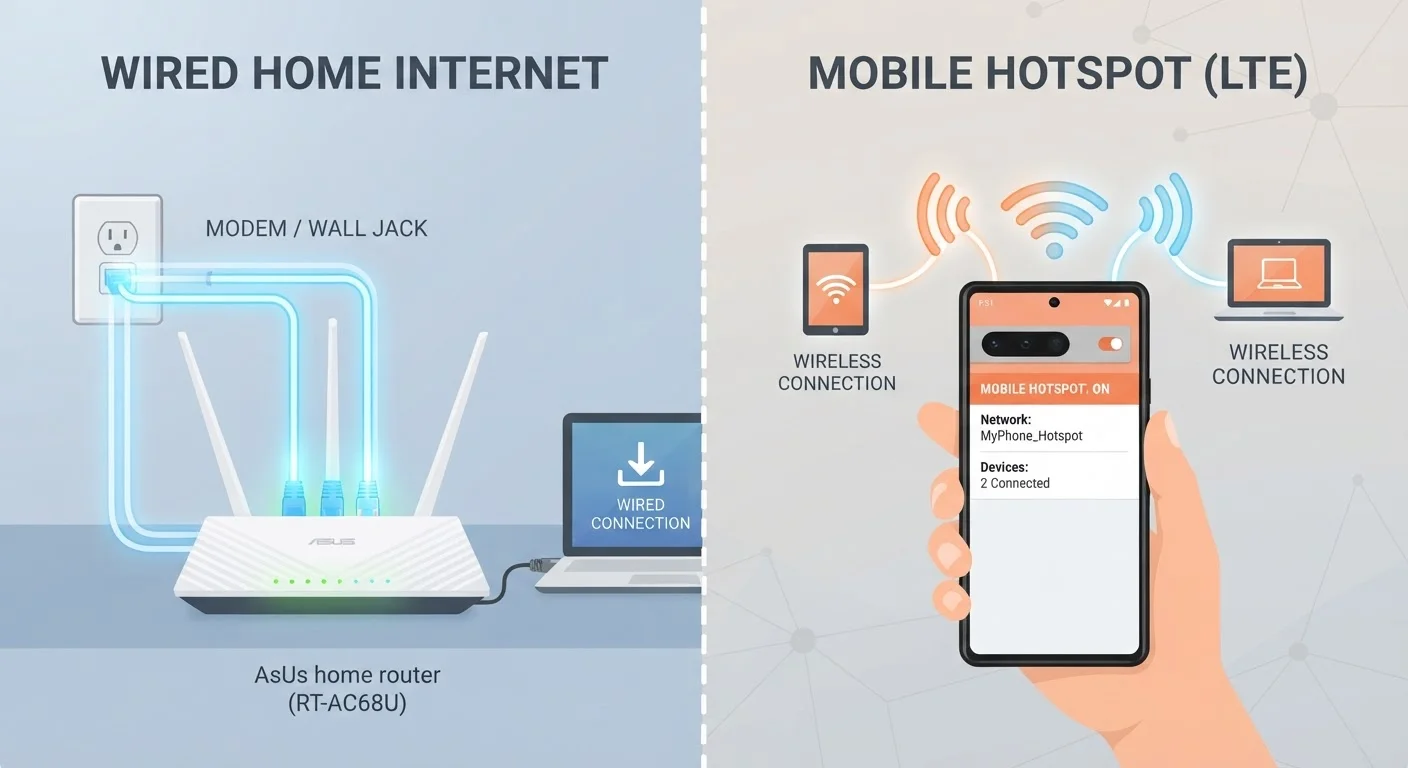
How Each Connection Type Actually Works
A fixed home internet connection — whether fiber, cable, or DSL — arrives at your home through a physical wire. That wire connects to a modem, which hands off the signal to a router, which then broadcasts Wi-Fi throughout your home. Because the signal travels over a dedicated line rather than shared airwaves, it tends to be consistent and stable. For a deeper look at the different wired connection types, see Home Internet 101.
A mobile hotspot works differently. It uses the same cellular network your smartphone does — 4G LTE or 5G — and converts that signal into a local Wi-Fi network your devices can join. You can get this through a standalone hotspot device or by enabling the tethering feature built into most smartphones. Either way, your connection is only as strong as the cellular signal where you're sitting.
Understanding this distinction — dedicated line versus shared cellular spectrum — explains most of the practical differences discussed below.
Speed, Latency, and Real-World Performance
Raw download speed gets most of the attention, but it isn't the whole story. For practical context on common speed misconceptions, see Internet Speed Myths That Confuse Most Households.
Speed: Fixed broadband plans commonly offer download speeds ranging from 25 Mbps on older DSL lines to well over 1 Gbps on fiber. Mobile hotspots on 4G LTE typically deliver 10–50 Mbps in real-world conditions; 5G hotspots can reach higher peaks, but performance varies considerably based on tower distance, congestion, and obstacles like walls or buildings.
Latency — the delay between sending a request and receiving a response — is where fixed internet holds a clearer advantage. Fiber and cable connections often measure latency below 20 milliseconds. Cellular connections commonly run 30–70 ms, and can spike higher when towers are congested. That gap is barely noticeable for streaming video, but it becomes meaningful during video calls, online gaming, or any application that requires fast back-and-forth communication.
| Fixed Home Internet | Mobile Hotspot | |
|---|---|---|
| Typical download speed | 25 Mbps – 1+ Gbps | 10–100 Mbps (varies by signal) |
| Latency | 10–30 ms (fiber/cable) | 30–70 ms, can spike higher |
| Data limits | Often unlimited or 1 TB+ | Tiered; throttled after limit |
| Reliability | High; dedicated line | Variable; depends on signal |
| Portability | Fixed to one address | Works anywhere with cell coverage |
| Setup complexity | Modem, router, installation | Enable on phone or carry device |
| Best for | Multi-device, heavy-use homes | Light users, backup, travel |
Upload speed is another consideration. Many fixed broadband plans offer asymmetric speeds — much faster downloads than uploads — but fiber often provides symmetrical speeds. Mobile hotspots similarly lean toward download performance. If you upload large files or use video conferencing regularly, check the upload figures, not just download.
Data Limits and Deprioritization
Most fixed home internet plans in the U.S. either have no data cap or set caps high enough (1 TB or more per month) that the average household rarely hits them. Mobile hotspot plans are a different story.
Wireless carriers typically offer hotspot data in tiered allotments. Once you exhaust your high-speed hotspot allowance — which may be separate from your phone's general data — speeds are often throttled to a fraction of normal performance. Even on unlimited plans, carriers generally reserve the right to deprioritize hotspot traffic during network congestion. That means your connection speed can drop significantly at peak hours simply because other users on the same cell tower have priority.
Watch for 'Unlimited' Plan Fine Print
Carrier plans marketed as unlimited often include a separate, lower hotspot data allotment distinct from your phone's data. After that allowance is consumed, speeds may drop to 600 Kbps or slower — barely enough for standard-definition video. Read the specific hotspot data terms, not just the headline plan description, before assuming unlimited means unrestricted.
This matters especially if you work from home, stream video in 4K, or have children using the connection simultaneously. A single HD video stream can consume 3 GB or more per hour. Running the math against your monthly hotspot allowance is essential before treating a mobile plan as your primary connection.
Reliability and Coverage Considerations
Fixed internet is generally more reliable day-to-day — outages happen, but they're typically tied to equipment issues or service disruptions rather than environmental factors. A mobile hotspot's reliability, by contrast, depends on where you are. Thick walls, distance from towers, and heavy local network use all affect signal quality in ways a wired connection simply doesn't face.
That said, mobile hotspots have a real advantage in one reliability scenario: as a backup. When your home broadband goes down, a hotspot can keep you connected for critical tasks. Many households keep a cellular backup for exactly this reason — not as a replacement, but as a safety net. If you're troubleshooting either type of connection, this connectivity checklist covers common fixes before you call your provider.
Coverage maps from carriers show theoretical reach, but signal strength inside buildings can differ significantly from outdoor readings. If you're considering a hotspot as a primary connection, testing actual signal strength at home — not just checking a map — is the most reliable way to assess viability.
Which Setup Fits Your Household?
The honest answer depends on three things: how much data you use, how many devices connect simultaneously, and how consistent your cellular signal is at home.
A single person who works in an office, streams occasionally in the evenings, and doesn't game online may find a well-priced hotspot plan adequate. A family of four with remote workers, school-age children doing homework, and multiple streaming devices running concurrently will almost certainly run into the limits of a mobile plan quickly.
For households that do choose fixed broadband, the next step is configuring it effectively. Setting Up a Home Network From Scratch walks through the process without assuming any technical background. Understanding how your router broadcasts different frequency bands — covered in our guide on Wi-Fi frequency bands — can also help you get the most from whatever connection you choose.
Neither option is universally right. The goal is matching the connection type to your actual usage, not the usage pattern you imagine you have. Check your current data consumption through your existing carrier or router app before making any decision.


