

What RAM Actually Does
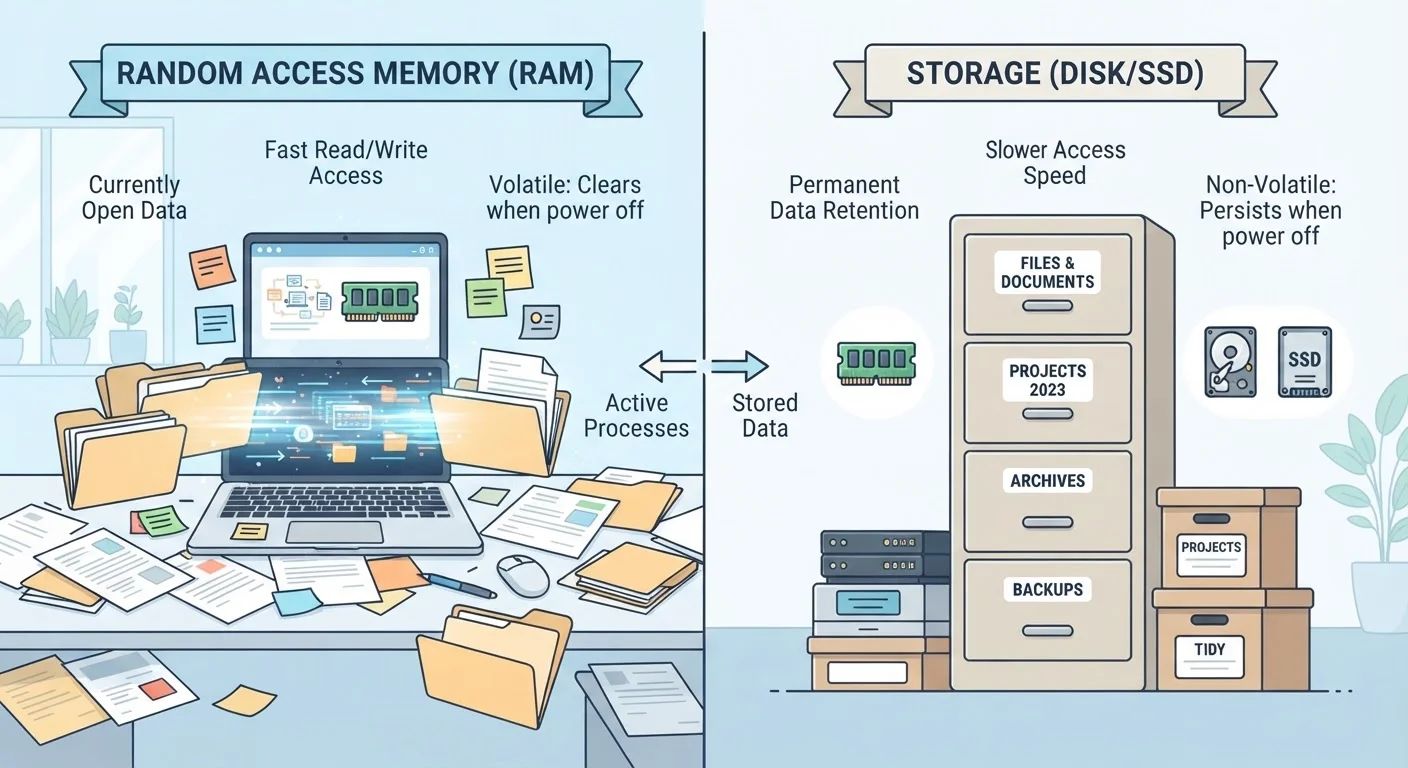
Think of RAM — short for Random Access Memory — as your device's desk surface. When you open an app, load a webpage, or start editing a photo, that work gets spread out on the desk so your processor can reach it instantly. The bigger the desk, the more tasks you can have open simultaneously without things getting cramped.
The critical detail: RAM is temporary. The moment you shut down or restart your device, everything on that desk gets swept clean. RAM doesn't hold anything permanently — it only holds what your device is actively using right now. That's why restarting a slow device often helps; it clears the desk and starts fresh.
When RAM fills up, your device starts doing something called swapping — borrowing space from storage to fake extra RAM. This process is dramatically slower, which is why a device with too little RAM for the tasks you're throwing at it feels sluggish and unresponsive. See our guide to what processors actually do for context on how RAM and the CPU work as a team.
What Storage Actually Does
Storage is the filing cabinet next to that desk. It holds everything permanently: your operating system, installed apps, photos, videos, music, documents — all of it stays put even when the device is powered off. Unlike RAM, storage capacity is measured in gigabytes (GB) or terabytes (TB), and modern devices typically offer far more storage than RAM precisely because they're solving different problems.
There are a few types of storage worth knowing. Traditional hard disk drives (HDDs) use spinning magnetic platters and are slower. Solid-state drives (SSDs) and flash storage (used in phones and tablets) have no moving parts and are significantly faster at retrieving files — but even the fastest SSD is much slower than RAM for active processing tasks.
Storage being full can cause problems of its own — devices often need a buffer of free space to operate smoothly — but it won't make your device fast. If you're curious about what's draining your storage, this breakdown of what fills up phone storage is a useful next step. For decisions about where files should actually live, see cloud vs. local storage explained.
Side-by-Side: How They Compare
The confusion between RAM and storage is understandable — both are measured in gigabytes, and device manufacturers often list both specs in the same breath. But they behave completely differently in practice.
| Criterion | RAM | Storage |
|---|---|---|
| Primary role | Active workspace for current tasks | Permanent file and app library |
| Persistence | Wiped on restart | Kept indefinitely |
| Speed | Extremely fast | Slower (SSD faster than HDD) |
| Typical capacity | 4GB–32GB (consumer devices) | 64GB–2TB (consumer devices) |
| Affects multitasking speed | Yes — directly | No |
| Holds your photos and files | No | Yes |
| Can usually be expanded later | Rarely (especially on phones) | Often (external drives, cloud) |
A useful way to remember the distinction: RAM is how much your device can think about at once, while storage is how much your device can remember long-term. A device with 4GB of RAM and 256GB of storage will feel slower during multitasking than a device with 8GB of RAM and 128GB of storage — even though the first device has more total memory by the numbers.
Why This Distinction Changes How You Troubleshoot
Knowing the difference helps you diagnose problems more accurately instead of chasing the wrong fix.
- Device feels laggy with multiple apps open: That's a RAM constraint. Closing background apps frees up RAM immediately.
- Can't download a new app or save a photo: That's a storage problem. Deleting old files or using cloud backup resolves it.
- Device is slow even with nothing open: Could be low RAM being used by the operating system itself, or a storage drive that's nearly full — both are worth checking.
- Apps crash unexpectedly: Often a sign that RAM ran out and the operating system had to force-close something to free up space.
Many people mistakenly free up storage expecting speed improvements, then wonder why nothing changed. If sluggishness is the problem, RAM is almost always the variable to examine. Just as internet speed myths lead people to wrong conclusions, RAM vs. storage confusion sends users troubleshooting in the wrong direction.
RAM Amounts Vary by Device Type
Smartphones typically ship with 4GB to 12GB of RAM, while laptops commonly range from 8GB to 32GB or more. Operating systems themselves consume a portion of available RAM before you open a single app — Windows, for example, can use 2GB or more at idle. This is worth factoring in when evaluating whether a device's RAM will feel adequate for your typical usage patterns.
Understanding these two components also helps when evaluating any device — phone, laptop, or tablet. The operating system on your device also plays a role in how efficiently RAM is managed, with some platforms handling low-RAM situations more gracefully than others.


