

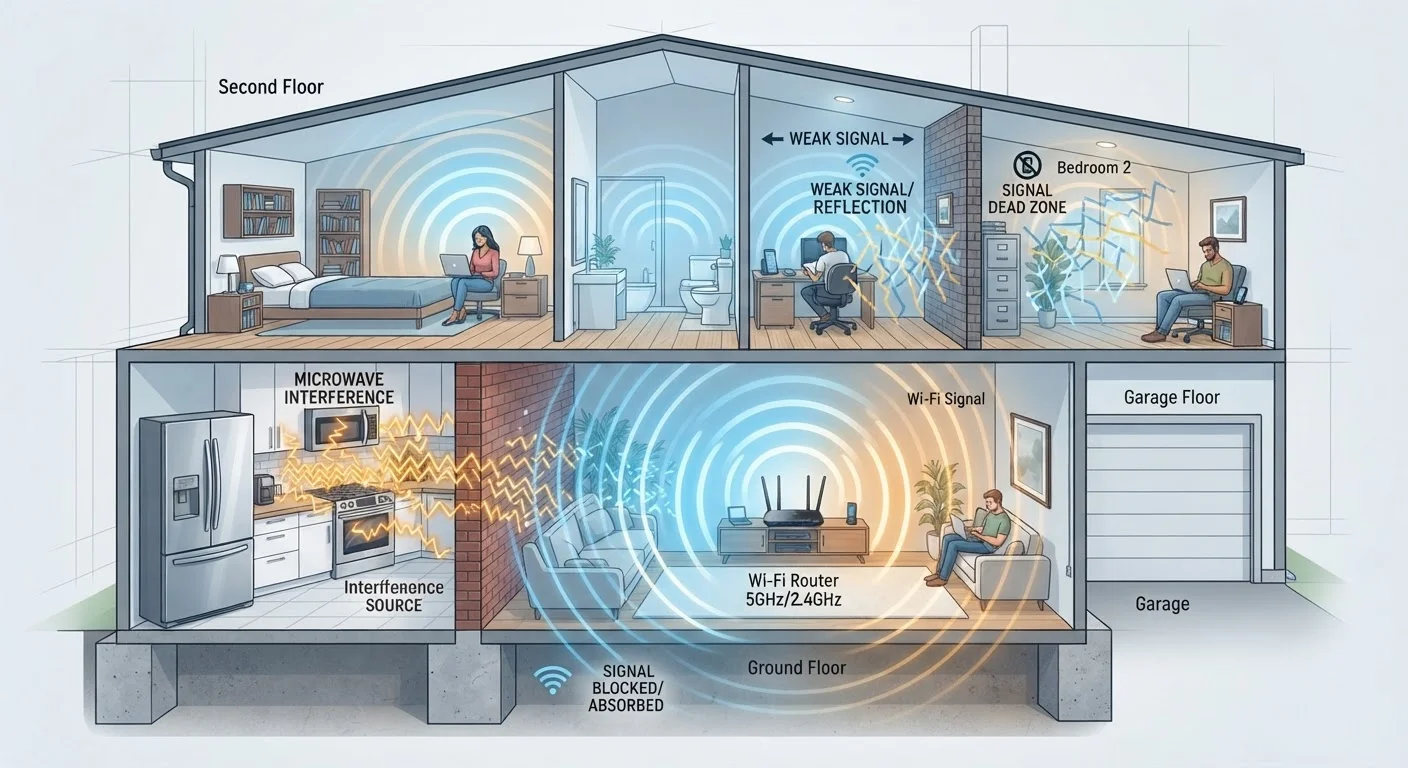
How Radio Waves Actually Move Through a House
Your router is essentially a small radio transmitter. It broadcasts wireless signals in all directions simultaneously — not in a neat, focused beam. Think of it like dropping a pebble in still water: ripples spread outward in every direction, gradually losing energy as they travel further from the source.
The critical difference from water ripples, though, is that Wi-Fi radio waves travel through three-dimensional space. They go up through the ceiling, down through the floor, sideways through walls — everywhere at once. That's both their strength and their weakness. Coverage is wide, but every material those waves pass through takes a toll on signal strength.
Signal strength is measured in dBm, and the scale is counterintuitive: numbers closer to zero are stronger. A reading of −50 dBm is excellent; −80 dBm is borderline usable. Every wall, floor, or obstacle nudges that number further in the wrong direction.
~50%
Signal loss through a single brick wall
Radio frequency engineering research consistently shows that a standard brick wall can reduce Wi-Fi signal strength by roughly half, depending on wall thickness and frequency used.
13
Non-overlapping channels on 5 GHz band (U.S.)
The 5 GHz band offers significantly more non-overlapping channels than the 2.4 GHz band's three, reducing co-channel interference in dense neighborhoods according to FCC frequency allocation guidelines.
~30 ft
Typical 5 GHz effective indoor range
Higher-frequency bands like 5 GHz trade range for speed and channel availability; practical indoor coverage typically spans 30–50 feet depending on construction materials, per Wi-Fi Alliance technical documentation.
What Your Walls Are Actually Doing to Your Signal
Not all walls are created equal when it comes to Wi-Fi. The impact depends almost entirely on what the wall is made of:
- Drywall (gypsum board): The most common interior wall material in American homes. Relatively transparent to Wi-Fi — typically causes only minor signal loss.
- Wood framing and plywood: Modest signal loss, similar to drywall. Rarely a significant problem on its own.
- Brick and concrete block: Dense materials that absorb substantially more radio energy. A single exterior brick wall can cut signal strength by 50% or more.
- Reinforced concrete: Found in some older homes, condos, and apartment buildings. One of the most significant barriers — capable of creating a near-total dead zone on the far side.
- Metal: The most disruptive material. Metal doesn't just absorb radio waves — it reflects them, creating unpredictable interference patterns throughout the space. Metal studs, foil-backed insulation, and metal ductwork are common culprits hiding inside walls.
Floors are walls in a horizontal orientation, so multi-story homes face the same problem vertically. A router on the first floor has to push signal through a floor assembly — subfloor, joists, sometimes concrete — just to reach the second story.
Understanding your home's construction helps you predict where signal will struggle. For a deeper look at how frequency choice affects wall penetration, see our guide on 2.4 GHz vs. 5 GHz vs. 6 GHz Wi-Fi bands.
The Interference Problem: It's Not Just Your Walls
Physical obstacles aren't the only thing shaping your Wi-Fi coverage. Interference from other devices and networks can degrade signal quality even in rooms with a strong signal reading.
Household appliances: Microwave ovens are the most well-known offender, but baby monitors, cordless phones, and some older Bluetooth devices also operate near the 2.4 GHz frequency band. When these devices run, they can temporarily disrupt connections on that frequency.
Neighboring networks: In an apartment building or a neighborhood with closely spaced homes, dozens of routers may be broadcasting simultaneously. If they're all using the same wireless channel, they compete for airtime — even when they're on separate networks. This is called co-channel interference, and it's one reason Wi-Fi can slow down in the evening when more households are active at once.
Large metal objects: Refrigerators, filing cabinets, and even large mirrors (which often have metal backing) can reflect or scatter signal in unexpected ways, creating interference patterns that are hard to diagnose without measurement tools.
The 2.4 GHz band is particularly crowded because it's been in use the longest and has the fewest non-overlapping channels. The 5 GHz and 6 GHz bands have more available channels and fewer competing devices — a meaningful practical advantage in dense environments.
Reading Your Floor Plan Like a Signal Map
Once you understand what blocks and disrupts Wi-Fi, you can look at your floor plan and make educated predictions about where coverage will be strong, weak, or absent.
Start at your router's current location and mentally trace lines to every room you use. Count the walls in between — note their likely construction. Flag any large appliances or metal objects along those paths. Areas with multiple dense barriers stacked in a line are your highest-risk dead zones.
A few practical patterns emerge in most American homes:
- Garage-adjacent rooms: Garages often have insulated walls with foil vapor barriers, which are highly reflective to radio signals.
- Rooms directly above or below the router: Signal traveling vertically through floor assemblies loses strength quickly, especially in homes with concrete subfloors.
- Far corners of large open-plan spaces: Even without walls, distance alone weakens signal. Open floor plans help, but they don't eliminate range limits.
- Home offices or bedrooms behind a bathroom: Plumbing walls are often thicker and contain moisture, which absorbs radio energy.
The most reliable fix for a persistent dead zone is moving the router closer to the problem area — or adding a second access point. Our article on router placement mistakes covers the most common errors in detail. For larger homes with multiple dead zones, mesh network systems distribute coverage using multiple interconnected nodes rather than relying on a single router to cover everything.
If wireless simply can't reach where you need reliable performance, it's worth knowing when a wired Ethernet connection still makes a real difference.


